HTML 指的是超文本标记语言 (Hyper Text Markup Language) 是一种使用标记标签来描述网页的标记语言,而不是编程语言。所谓的超文本就是指页面内可以包含图片、链接、甚至音乐,等非文字元素。HTML文件的后缀名是.html,使用一般的文本编辑器就能编辑,之后再使用浏览器打开,就能看见你所编辑的网页。
HTML文件结构
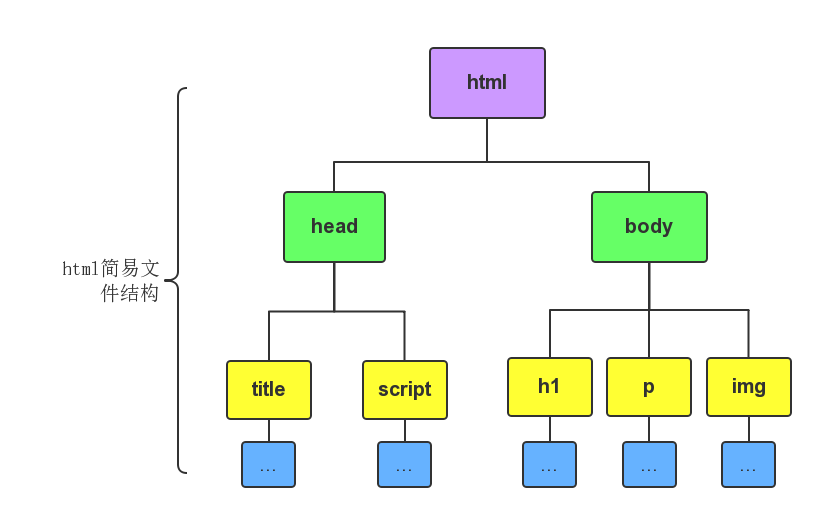
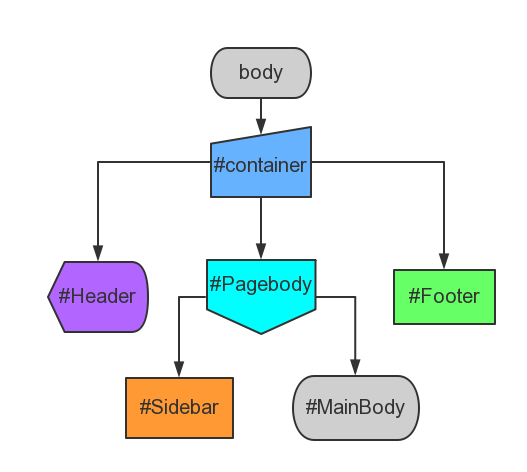
上图展示的是html文件简单的机构图,由此可见,一般的html文件结构就是下面这样的:
1
2
3
4
5
6
7
8
9
<html>
    <head>
            <title>.....</title>
    </head>

    <body>
            <p>.....</p>
    </body>
</html>
HTML是一种标记语言,这些<..>就叫做标签,而HTML就是使用这些标签来描述网页的。
HTML文档
HTML文档 也被称为网页,HTML 文档包含 HTML 标签 和 纯文本。Web 浏览器的作用是读取HTML文档,并以网页的形式显示出它们。浏览器不会显示 HTML标签(相当于是隐藏的格式描述),而是使用标签来解释页面的内容。
<html> <head> <title> Koen's First Web </title> </head>
<body> <h1> My Firest Web </h1> <p> Hello,My name is koen! </p> </body> </html>
HTML文本
HTML元素
什么是HTML元素
HTML 元素指的是从开始标签(start tag)到结束标签(end tag)的所有代码。 HTML网页实际上就是由许许多多各种各样的HTML元素构成的文本文件,并且任何网页浏览器都可以直接运行HTML文件。所以可以这样说,HTML元素就是构成HTML文件的基本对象,HTML元素可以说是一个统称而已。HTML元素就是通过使用HTML标签进行定义的。
<开始标签> 元 素 内 容 <结束标签>
下面这就是一个元素:
<p> Hello,My name is koen! </p>
HTML元素语法
HTML 元素以开始标签起始
HTML 元素以结束标签终止
元素的内容是开始标签与结束标签之间的内容
某些 HTML 元素具有空内容(empty content)
空元素在开始标签中进行关闭(以开始标签的结束而结束)
大多数 HTML 元素可拥有属性
HTML元素嵌套示例
HTML嵌套 顾名思义就是在一个HTML元素的内容中嵌入了另一个HTML元素,例如:
1 2 3 4 5
<html> <body> <p> Hello,My name is koen! </p> </body> </html>
上述例子中一共有三个元素,这样你是否理解了所谓的HTML元素嵌套呢?
HTML空元素
没有内容的 HTML 元素被称为空元素。<br> 就是没有关闭标签的空元素(<br>标签用来定义换行)。在 XHTML、XML 以及未来版本的 HTML 中,所有元素都必须被关闭。在开始标签中添加斜杠,比如<br/>,是关闭空元素的正确方法,即使 <br>在所有浏览器中都是有效的,但使用<br/>其实是更长远的保障,说了那么多就是想说以后换行就用<br/>。
<html> <head> <title> Koen's First Web </title> </head>
<body> <h1align="center"> My Firest Web </h1> <p> Hello,My name is koen! </p>
<b> bold words </b><br/> <strong> strong words </strong><br/> <big> big works </big><br/> <em> emphasized words <em/><br/> <i> italic words </i><br/> <small> small words </small><br/> </body> </html>
<html> <head> <title> Koen's First Web </title> </head>
<body> <h1align="center"> My Firest Web </h1> <p> Hello,My name is koen! </p>
<pre> <b> bold words </b> <strong> strong words </strong> <big> big works </big> <em> emphasized words <em/> <i> italic words </i> <small> small words </small> </pre> </body> </html>
style 提供了一种改变所有 HTML 元素的样式的通用方法。这里可以将背景颜色、字体样式、字体尺寸、字体颜色、对齐方式一并定义好。
1 2 3 4 5 6 7 8 9 10 11 12
<html> <head> <title> Koen's First Web </title> </head>
<bodystyle="background-color:powderblue"> <h1style="text-align:center"> show some function of style </h1> <pstyle="text-align:center;font-family:verdana;color:gray"> verdana and white </p> <pstyle="font-family:time;color:green"> time and green words </p> <pstyle="font-size:40px"> the size of these words is 40 pixels </p> </body> </html>
<html> <head> <title> Koen's First Web </title> </head>
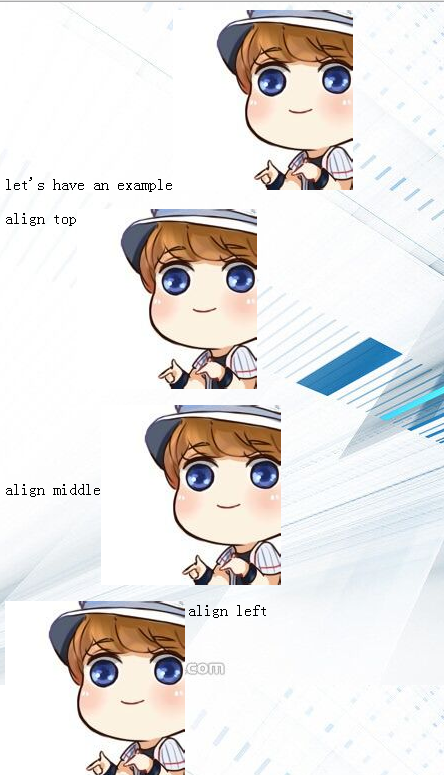
<body> <p> let's have an example </p> <p> <ahref="http://www.baidu.com"target="_blank"title="this word will link to the web of baidu"><imgsrc="happy.png" /></a> </p> </body> </html>
<html> <head> <title >TABLE</title> </head> <bodystyle="font-size:20px"> <pstyle="text-align:center">table practice</p> <tablealign="center"border="1"> <tr> <td>first row and first column</td> <td>first row and second column</td> <td>first row and third column</td> </tr> <tr> <td>second row and first column</td> <td>second row and second column</td> <td>thirt row and third column</td> </tr> </table> </body> </html>
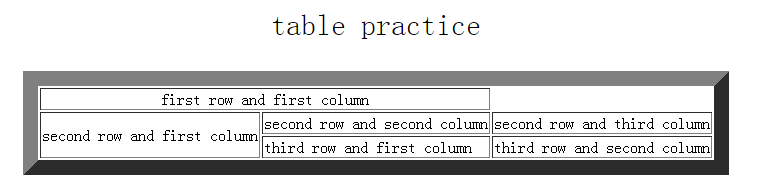
<html> <head> <title >TABLE</title> </head> <bodystyle="font-size:30px"> <pstyle="text-align:center">table practice</p> <tablealign="center"border="15" > <tr> <tdalign="center"colspan="2">first row and first column</td> </tr> <tr> <tdrowspan="2">second row and first column </td> <td>second row and second column </td> <td >second row and third column</td> </tr> <tr> <td>third row and first column </td> <td>third row and second column </td> </tr> </table> </body> </html>
<div>用来定义文档中的分区或节(division/section),没有特定的含义。它是可用于组合其他 HTML 元素的容器
<span>用来组合文档中的行内元素,也没有特定的含义
<div>的用法:
1 2 3 4 5 6 7 8 9 10 11 12 13
<html> <head> <title> Koen's Test Web </title> </head>
<bodystyle="font-size:20px;background-color:gray"> <divstyle="color:white"> <h3>This is a header</h3> <p>This is a paragraph.</p> <p>we can control all style in div</p> </div> </body> </html>
<html> <head> <title> Koen's Test Web </title> </head>
<bodybgcolor="gray">
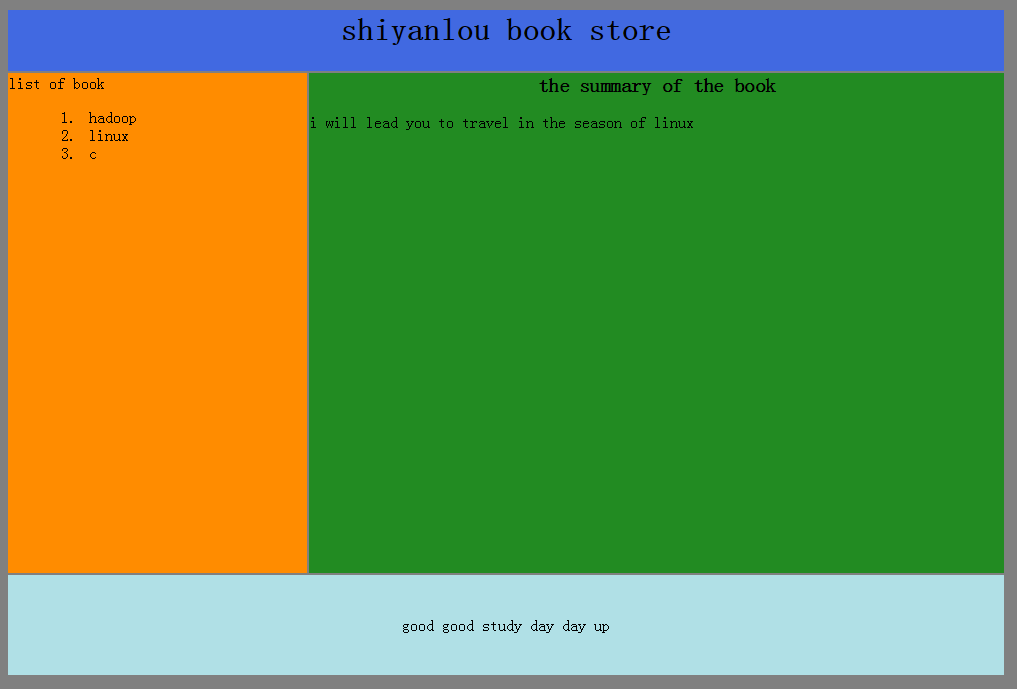
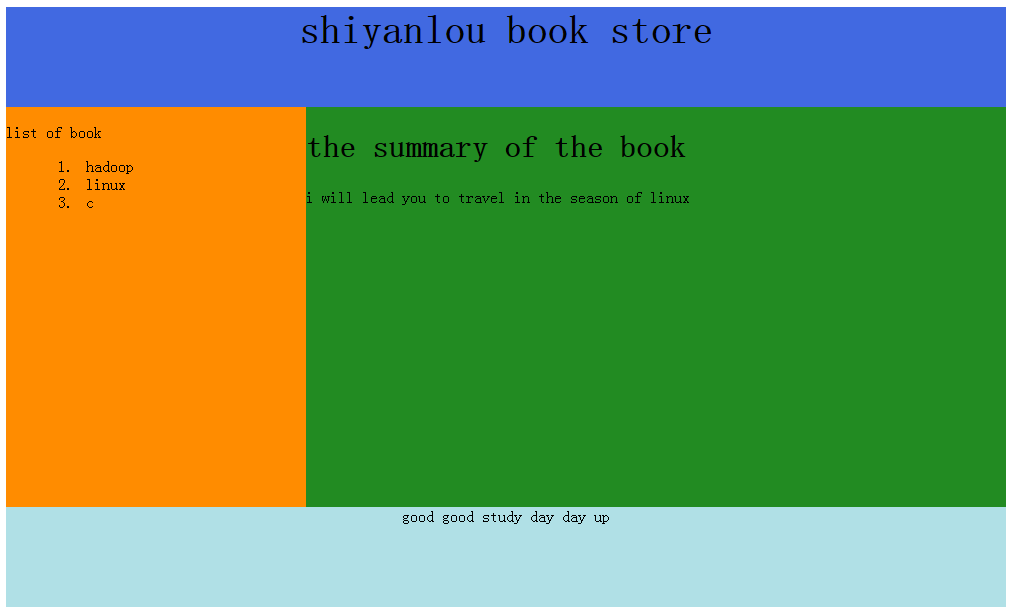
<tablewidth="1000"> <tr> <tdcolspan="2"style="background-color: royalblue"> <h1align="center">shiyanlou book store</h1> </td> </tr>
<trvalign="top"> <tdstyle="background-color: darkorange;width:300px"> <dl> <dt>list of book</dt> <dd> <ol> <li>hadoop</li> <li>linux</li> <li>c</li> </ol> </dd> </dl> </td> <tdstyle="background-color: forestgreen;height:500px;width:700px;"> <h1style="font-size: 20px;text-align: center">the summary of the book</h1> <p>i will lead you to travel in the season of linux</p> </td> </tr>
<tr> <tdcolspan="2"style="background-color: powderblue;text-align:center;height: 100px"> good good study day day up</td> </tr>
<body> <divid="container"> <divid="header"> <h1>shiyanlou book store</h1> </div> <divid="sidebar"> <dl> <dt>list of book</dt> <dd> <ol> <li>hadoop</li> <li>linux</li> <li>c</li> </ol> </dd> </dl> </div> <divid="mainbody"> <h1>the summary of the book</h1> <p>i will lead you to travel in the season of linux</p> </div> <divid="footer">good good study day day up</div> </div> </body> </html>
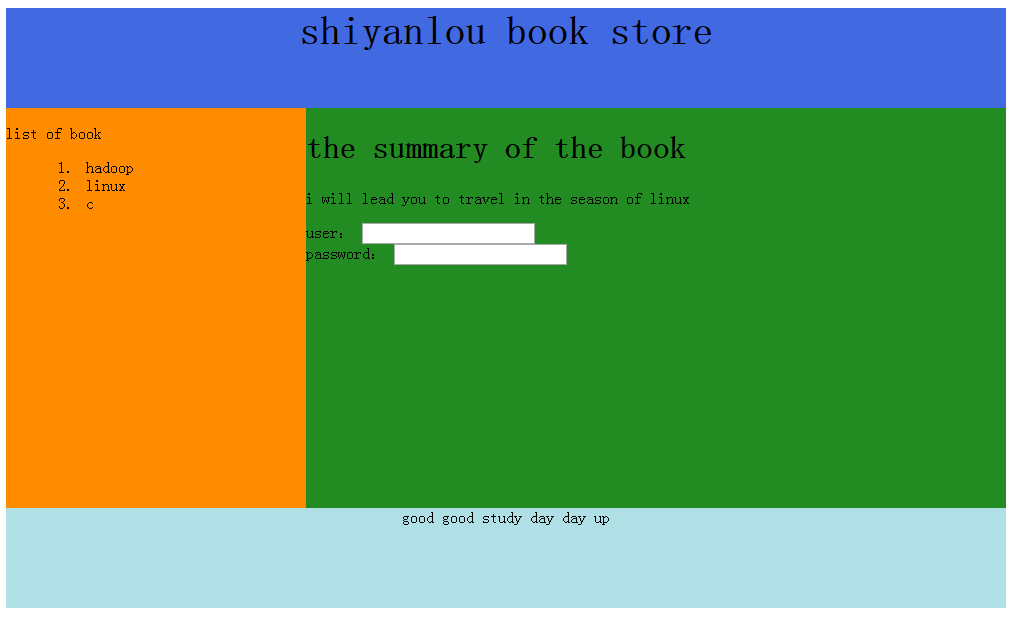
<body> <divid="container"> <divid="header"> <h1>shiyanlou book store</h1> </div> <divid="sidebar"> <dl> <dt>list of book</dt> <dd> <ol> <li>hadoop</li> <li>linux</li> <li>c</li> </ol> </dd> </dl> </div> <divid="mainbody"> <h1>the summary of the book</h1> <p>i will lead you to travel in the season of linux</p> <form> user: <inputtype="text"name="user"> <br /> password: <inputtype="password"name="password"> </form> </div> <divid="footer">good good study day day up</div> </div> </body> </html>
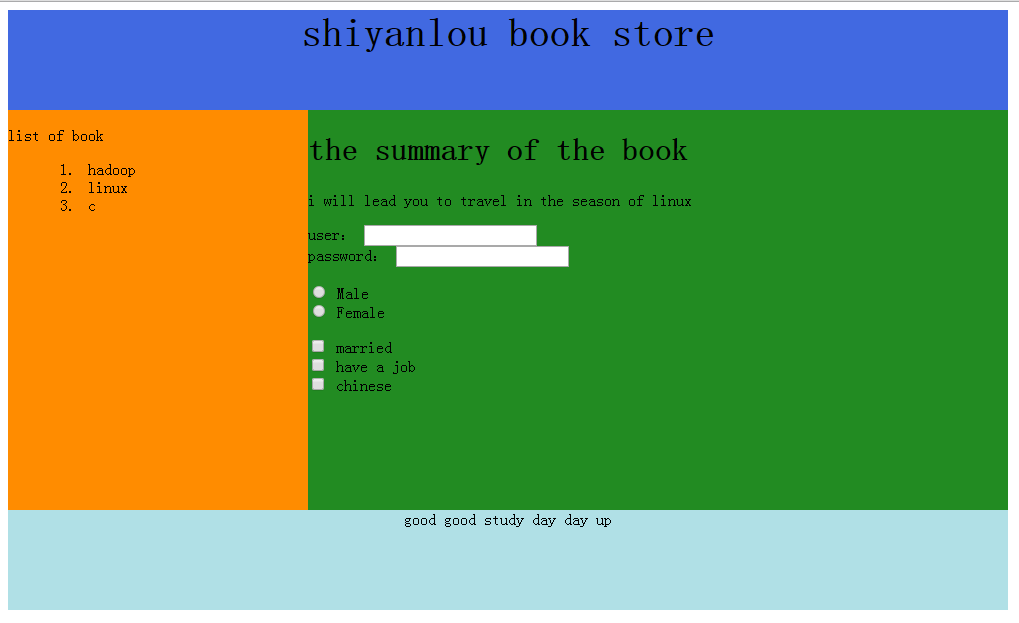
<body> <divid="container"> <divid="header"> <h1>shiyanlou book store</h1> </div> <divid="sidebar"> <dl> <dt>list of book</dt> <dd> <ol> <li>hadoop</li> <li>linux</li> <li>c</li> </ol> </dd> </dl> </div> <divid="mainbody"> <h1>the summary of the book</h1> <p>i will lead you to travel in the season of linux</p> <form> user: <inputtype="text"name="user"> <br /> password: <inputtype="password"name="password"> </form> <form> <inputtype="radio"name="sex"value="male" /> Male <br/> <inputtype="radio"name="sex"value="female" /> Female </form> <form> <inputtype="checkbox"name="married" /> married <br/> <inputtype="checkbox"name="have a job" /> have a job <br/> <inputtype="checkbox"name="chinese" /> chinese </form> </div> <divid="footer">good good study day day up</div> </div> </body> </html>